AWS Just Killed Your Selenium Bot — How AgentCore Browser Tool Replaces Rules-Based RPA for Legacy Web Apps
Published on 2026-08-14
AWS released AgentCore Browser Tool on Aug 13, 2026 — a managed Chromium + vision-driven agent hosting surface for legacy HTML web apps. Here's why this is the first credible replacement for rules-based RPA.
AWS Just Killed Your Selenium Bot — How AgentCore Browser Tool Replaces Rules-Based RPA for Legacy Web Apps
On August 13, 2026, AWS shipped a thing nobody asked for and most enterprises have been quietly begging for: Amazon Bedrock AgentCore Browser Tool, a managed Chromium that AI agents drive over Playwright and the Chrome DevTools Protocol, wrapped in IAM, session isolation, and audit logs (AWS Machine Learning Blog, "Automate legacy web applications with Amazon Bedrock AgentCore Browser Tool," Aug 13, 2026).
The headline isn't the browser. Headless Chrome has been around since 2014. The headline is what AWS bolted onto it: a production-grade agent hosting surface that turns legacy HTML-rendered web apps into something a vision-capable foundation model can drive, the same way a human would, without brittle CSS selectors or a fleet of Windows VMs.
For any company still paying UiPath or Automation Anywhere to keep Selenium-style bots alive, this is the first credible replacement that doesn't require rewriting the legacy system first.
Why traditional RPA keeps breaking
Pick almost any large enterprise — insurance, healthcare, manufacturing, retail, financial services — and the same scene plays out. The system of record is a server-side middleware stack from the late 1990s or early 2000s that renders HTML, CSS, and JavaScript for a browser. There is no REST API. There is no GraphQL. There is just a screen designed for a human operator.
AWS describes the case in the post: a large insurance company that processes tens of thousands of operational changes a year across legacy policy administration systems. Plan modifications, claims adjustments, coverage updates, endorsements. Each change requires navigating multi-step workflows, entering data across multiple screens, and validating against business rules (AWS Machine Learning Blog, 2026).
Rules-based RPA fails here for three reasons that the post is honest about:
AWS Just Killed Your Selenium Bot — How AgentCore Replaces RPA
Selectors are brittle. The moment the legacy UI team ships a styling update or a new validation step, the bot's XPath breaks and someone gets paged.
MFA and SSO stop bots cold. Some legacy apps require multi-factor auth, some use proprietary single sign-on, and most use session tokens with unpredictable expiration. RPA vendors build workarounds, but each workaround is a new thing that breaks.
Audit and retention don't fit RPA's model. Financial regulations demand tamper-proof record retention for six years with immediate access to the most recent 90 days (AWS Machine Learning Blog, 2026). Most RPA systems can't give you that without extensive custom work.
The result, AWS argues, is that production RPA deployments end up with "a long tail of manual interventions." Every quarter, somebody hand-fixes what the bots broke.
The fundamental shift RPA couldn't make: from automation that mimics clicks to automation that sees the screen and decides.
What changed: vision plus ReAct in the loop
The old model was: script a sequence of DOM operations. Find the input by selector, type, click submit, wait for the success element, log out.
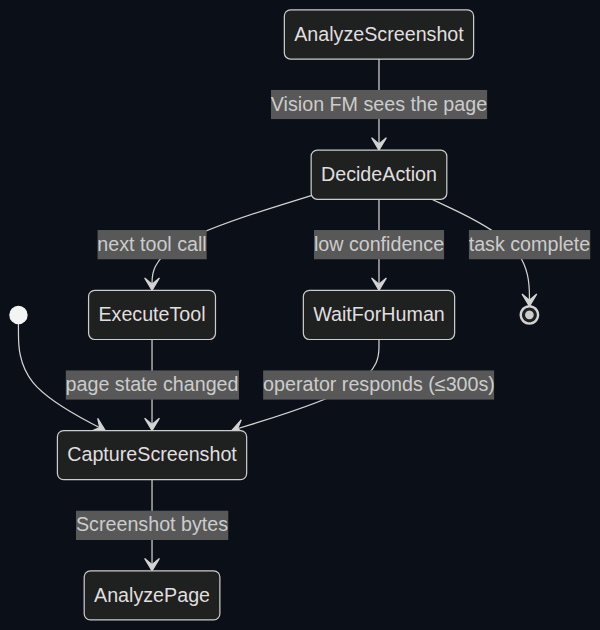
The new model in AgentCore Browser Tool is: take a screenshot, send it to a vision-capable foundation model on Amazon Bedrock, ask "what's on screen and what should I do next?", call the right tool, repeat.
The framework doing the orchestration is Strands Agents, an open-source orchestration layer AWS released and now uses across its agent reference architectures. Strands runs a ReAct loop — Reason + Act — where the model captures a screenshot, analyzes the page visually, decides which tool to call (click, fill, scroll, pause), executes it, observes the result, and repeats (AWS Machine Learning Blog, 2026).
The difference looks subtle on paper. It is not subtle in production.
A rules-based bot fails when the page renders differently than expected. A vision-driven agent reasons through the new state. If a confirmation dialog appears unexpectedly, the agent doesn't crash. It looks at the dialog, reads the prompt, and decides.
For the insurance company in the post, a single natural-language instruction — "open policy #12345, update the coverage amount to $500,000, and submit for approval" — drives the complete plan modification workflow. The agent navigates to the right policy, identifies form fields from the screenshot, enters changes across multiple screens, handles validation prompts, and submits (AWS Machine Learning Blog, 2026).
No human has to script each step. No selector has to be maintained as the UI evolves.
The architecture in five pieces
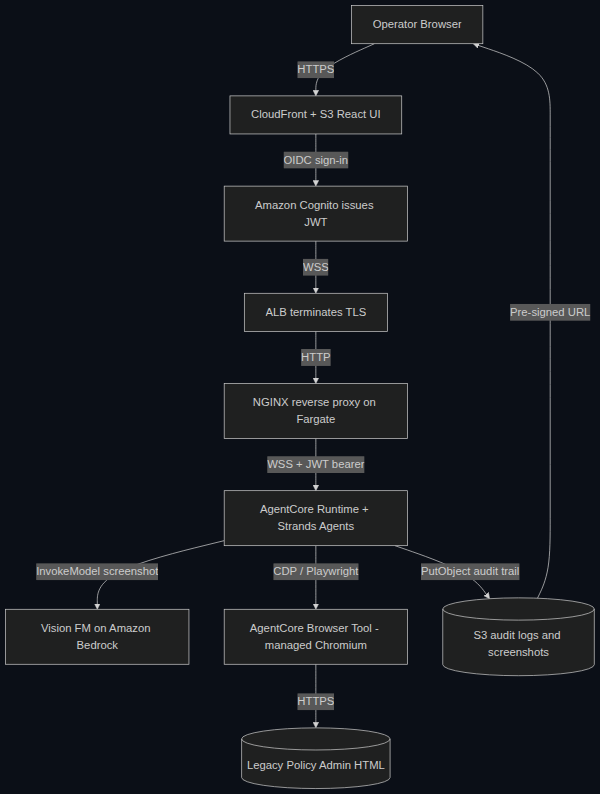
The reference implementation AWS published isn't a toy. It is a deployable blueprint with Terraform, a GitHub repo, and an enterprise use case attached. The components are deliberately small and tightly scoped.
A React single-page app served from Amazon CloudFront and a private S3 bucket. The operator gets a chat-style interface where they can type natural-language instructions and watch the agent work.
Amazon Cognito for authentication. The operator signs in through OIDC; Cognito issues a JWT that flows through the rest of the stack. Microsoft Entra ID and Okta work by swapping the discovery URL.
An ALB and an NGINX reverse proxy on AWS Fargate. The WebSocket terminates at the ALB, then NGINX forwards the connection to the AgentCore runtime with the JWT in the Authorization header. NGINX exists because the AgentCore runtime requires the JWT in the header but the browser sends it as a query string — a small but real piece of plumbing the post is honest about.
AgentCore runtime running Strands Agents. The runtime validates the JWT, routes to the browser-agent container, and provides session isolation, IAM, and audit logging. This is the part AWS has spent the last six months building out — it is the actual product surface, not the browser.
AgentCore Browser Tool, a managed Chromium in the cloud. Each browser session runs in its own isolated environment with dedicated CPU, memory, and filesystem. When the session ends, the environment is terminated and the state is sanitized (AWS Machine Learning Blog, 2026).
The agent connects to the Browser Tool over Playwright and the Chrome DevTools Protocol. The target legacy application only needs to be reachable over HTTP or HTTPS — there is no requirement that it was originally designed for Chrome, or any modern browser.
The whole loop is auditable. The agent stores session transcripts and screenshots to S3, generates pre-signed URLs for each screenshot, and streams the URL back to the operator's browser. The image bytes never travel through the WebSocket — only the short-lived URL does. Combined with AWS CloudTrail logging, this is the audit trail regulated industries actually need.
Why this matters beyond the AWS stack
Three features make the Browser Tool more than a demo.
Browser profiles persist authentication state across sessions. An operator — or the first run of the agent — performs an MFA flow once. Subsequent sessions resume already signed in. This kills the largest source of RPA failures (AWS Machine Learning Blog, 2026).
Proxy configuration routes traffic through corporate networks. Internal legacy applications behind corporate firewalls or IP-allowlisted portals are reachable through domain-based routing and credentials stored in AWS Secrets Manager. RPA vendors do not have an answer for this — it is usually a six-month professional services engagement.
Session recording captures every interaction. Clicks, form inputs, page navigation, all stored in S3 with CloudTrail logging. For financial regulations requiring six-year retention and immediate access to the most recent 90 days, the Browser Tool ships with the audit surface built in (AWS Machine Learning Blog, 2026).
The same day AWS published the Browser Tool, they also released AgentCore Observability for agents running on EKS, ECS, Lambda, on-premises, or other clouds (AWS Machine Learning Blog, "Monitor on-premises and multi-cloud AI agents with AgentCore Observability," Aug 13, 2026). The two announcements are part of the same product. AWS is building an agent hosting platform, and the Browser Tool is one of the workloads it can host.
This is AWS betting that "agent hosting" becomes a category the same way "container hosting" did in 2015.
What it does not solve
A fair accounting of the limits matters before anyone green-lights a migration.
No published performance benchmarks. AWS describes the architecture but does not give latency per step, screenshot throughput, or cost per task. Anyone planning a migration has to run their own measurement.
Vision FMs are slower per step than selector scripts. A ReAct loop that takes a screenshot, calls a vision model, and reasons through the response is slower than a UiPath selector hitting a DOM directly. The trade is reliability for latency — the agent adapts when the page changes, but it does not move at Selenium speed.
No customer-reported cost numbers yet. The reference implementation is new. There is no public case study comparing the total cost of running Browser Tool against an equivalent UiPath deployment at scale.
Selection of the right use case matters. This is the right architecture for legacy HTML systems that resist API modernization. It is the wrong architecture for greenfield work where a REST API would have cost less than the runtime fees.
Three questions to audit any legacy workflow
Before handing a workflow to an agent that can see the screen, run it through this checklist.
1. How often does the underlying UI change? If the legacy team ships a CSS update every quarter, RPA will keep paging you. A vision-driven agent adapts to layout drift because it sees pixels, not selectors.
2. Where is the human approval gate? The Browser Tool pauses for human input before critical actions (submit, beneficiary change, endorsement over threshold) with a default 300-second timeout (AWS Machine Learning Blog, 2026). If your compliance regime requires human approval before the action becomes permanent, this design matches it by default.
3. What is the audit surface you actually need? CloudTrail plus session recording in S3 is a complete record. If your regulator asks for tamper-proof retention, the answer is in the architecture.
The judgment
The question isn't whether to migrate off RPA today. Most RPA deployments are still running. The maintenance cost is real but bearable.
The question is what you do over the next twelve months.
The legacy HTML stack is no longer a moat for RPA vendors. AWS has shipped the agent hosting surface, the browser, the observability, and the identity plumbing. UiPath and Automation Anywhere are still the right answer for high-volume, low-cognition work in greenfield systems. They are no longer the right answer for legacy web apps that change shape.
If you have a workflow where the UI drifts, the auth is painful, and the audit is non-negotiable — you have a candidate for Browser Tool today. If you have a workflow that has been stable for three years and runs a million times a day with sub-second SLA, leave it on the RPA stack.
The agent that can see the screen is not faster than a script. It is more useful than a script. That distinction is the whole bet.